Known Problems
One of the arms can not be controlled (e.g. using MoveIt)
MoveIt only recognizes the controller for one arm at startup. We suspect this happens because the other controller is not yet online when the move_group node is initialized.
To resolve this, you can restart the move_group node after ensuring that all controllers are active. This can be done as follows:
-
Kill the existing MoveIt node:
rosnode kill move_group
-
Restart MoveIt with the appropriate launch file:
roslaunch talos_moveit_config move_group.launch
After restarting, MoveIt should correctly detect all controllers.
Low resolution of depth images from gripper cameras
The depth image resolution is 96*172, which does not match the setting in the launch file. This is caused by the decimation filter with a magnitude of 5.
This can be solved by setting the decimation magnitude to 1 and restarting the camera. Example for the right gripper camera:
-
Setting the decimation magnitude to 1:
rosservice call /gripper_left_rgbd_camera/decimation/set_parameters "{config: {ints: [{name: 'filter_magnitude', value: 1}]}}"
-
reset the camera to apply:
rosservice call /gripper_left_rgbd_camera/realsense2_camera/reset
The depth images resolution should now be 480*848.
Head camera RGB image is too bright / has blown-out glare
The head RGB camera (/rgbd/rgb/rgbd_astrapro_rgb, an Orbbec Astra Pro on libuvc) does not expose exposure or gain — the firmware locks those. It does expose the UVC Processing-Unit controls via dynamic_reconfigure: brightness, contrast, gamma, saturation, sharpness and hue. brightness is the effective lever for over-bright images and blown-out reflections (negative = darker).
The values apply immediately, no camera restart is needed. Set a parameter with dynparam:
rosrun dynamic_reconfigure dynparam set /rgbd/rgb/rgbd_astrapro_rgb brightness -48
Equivalently via the set_parameters service:
rosservice call /rgbd/rgb/rgbd_astrapro_rgb/set_parameters "{config: {ints: [{name: 'brightness', value: -48}]}}"
To inspect the current values or tune interactively with live sliders, use rqt:
rosrun rqt_reconfigure rqt_reconfigure
To make a value persist across camera restarts, add it to the libuvc node in pal_orbbec_pro.launch on the robot, e.g. <param name="brightness" value="-48"/>.
Recover a faulted drive without rebooting the robot
Use this when a drive latches a fault (e.g. leg_left_3 CANopen FeedbackError 0x7300). The bring-up is owned by the PAL startup manager (app ros_bringup), so stop/start it through pal-stop/pal-start — never kill the roslaunch PID directly, the manager will respawn it.
Warning
The robot must be supported / in the air: restarting the deployer drops every drive and every controller.
# 1. Reset the faulted drive: restart the EtherCAT/control deployer
pal-stop deployer
# wait until the realtime node is actually gone before restarting
while rosnode list 2>/dev/null | grep -q rtt_deployer; do sleep 1; done
pal-start deployer

# 2. Re-spawn controllers + bring-up on the fresh controller_manager.
#    Do NOT 'roslaunch talos_bringup talos.launch' directly: move_group/play_motion/
#    robot_state_publisher are still running, so a manual launch collides
#    ("new node registered with same name"). Go through the startup manager:
pal-stop ros_bringup
pal-start ros_bringup

# 3. Re-run the REQUIRED pre-flight status check (it gates high-level motion)
rosrun talos_controller_configuration talos_initialisation.py --yes
Why this order matters: bouncing deployer creates a fresh controller_manager, which orphans the controllers spawned into the old one. Until ros_bringup is restarted, the joint_state_controller is not loaded, so /joint_states has no publisher and all ROS-level arm/torso/head motion (play_motion, MoveIt, walk_pose) times out — while the legs keep working because the walking controller reads feedback from the realtime layer directly. After step 2, confirm recovery with rostopic hz /joint_states.
Ankle roll joint is mechanically blocked (harmonic drive at its limit)
If an ankle roll joint (leg_left_6 / leg_right_6) is driven past its mechanical limit, the harmonic drive can block: the teeth of the flex spline and the circular spline slip out of their normal configuration and jam. The joint then no longer moves, and no software-side reset will recover it — the drive has to be opened and unblocked by hand.
The procedure below is PAL's (original slides, sent by PAL support). If anything is unclear or the rotor does not free up, contact PAL before applying force.
Disconnect the battery first
Before any intervention that removes or disconnects components from the robot, it is mandatory to disconnect the battery from the power board PB17. Remove the right cover of the battery pack to access the connector. Once unplugged, protect the connector so that no external object or finger can touch the pins.
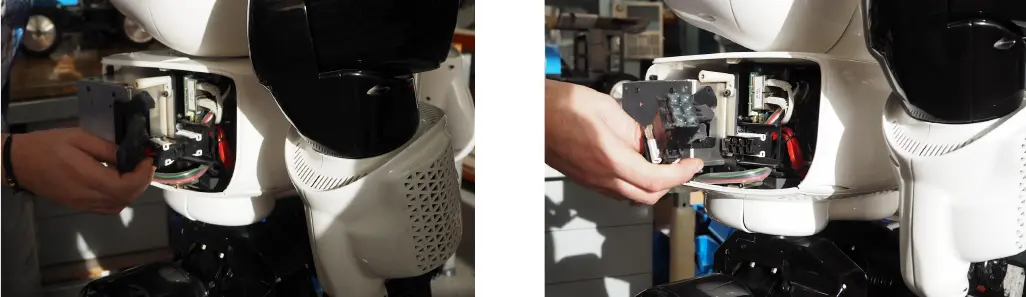
Step 1 — Remove the (x4) M4×12 mm screws.
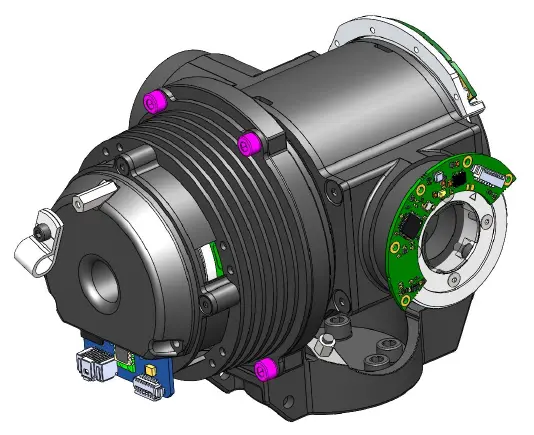
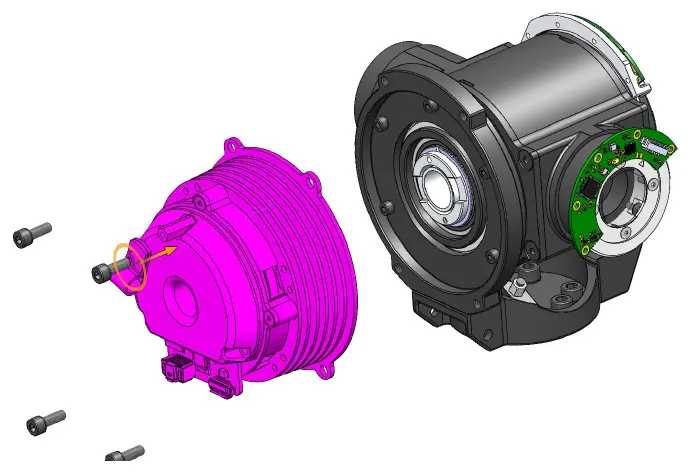
Step 2 — Carefully separate the motor subassembly, without damaging the cables. The motor stays connected, so support it instead of letting it hang from its wiring.
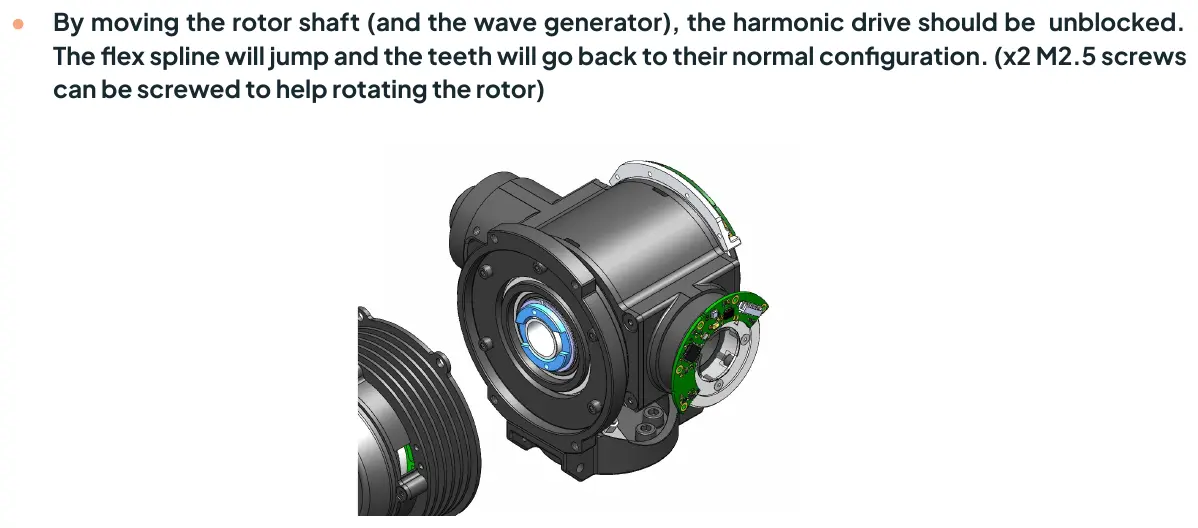
Step 3 — Rotate the rotor to unblock the harmonic drive. By moving the rotor shaft (and with it the wave generator), the flex spline will jump and the teeth go back to their normal configuration. Two M2.5 screws can be screwed into the rotor to get a grip for rotating it.
Step 4 — Mount everything back by following the steps in the opposite order.
Afterwards, reconnect the battery, switch the robot on and move the ankle through its full range (robot supported / in the air) to confirm the joint runs freely again.
leg_left_3 CANopen FeedbackError 0x7300 keeps recurring (encoder out of tolerance)
If leg_left_3_motor (left hip pitch) repeatedly faults with CANopen FeedbackError 0x7300 — typically crashing the MPC a few seconds after start — the cause is usually not transient: the absolute encoder reader is out of tolerance relative to the magnetic target. The recovery in Recover a faulted drive without rebooting the robot only clears the latched fault; if the encoder gap is wrong it will fault again.
The encoder is the RLS AksIM-2 absolute magnetic encoder in the inner upper part of the femur. Its reader board has a status LED:
- Green — OK (inside tolerance)
- Orange — warning (still inside tolerance)
- Red — error (out of tolerance) → this triggers
FeedbackError
With the robot completely switched off, remove the cover and inspect:
- Check that the screws of both the reader board and the magnetic target are tight (not loose).
- Check the cabling and the target for visible damage (a reader that sits too close can scratch the magnetic stripes during motion).
- Switch the robot on and watch the LED while slowly moving the hip pitch through its range — a sector that turns the LED red indicates misalignment or a damaged target.
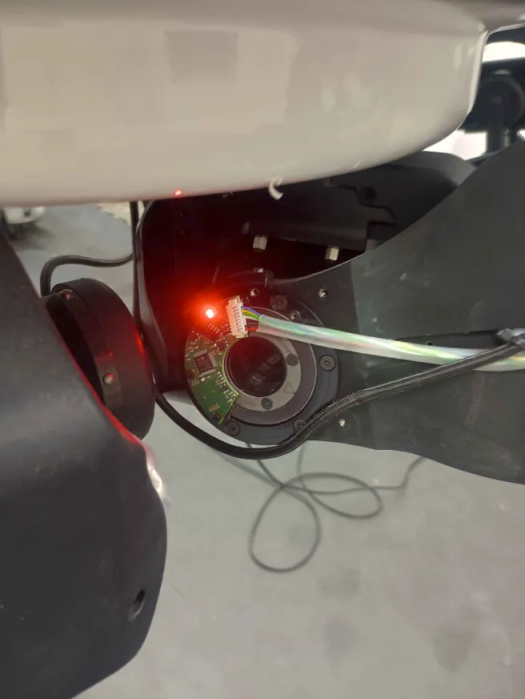
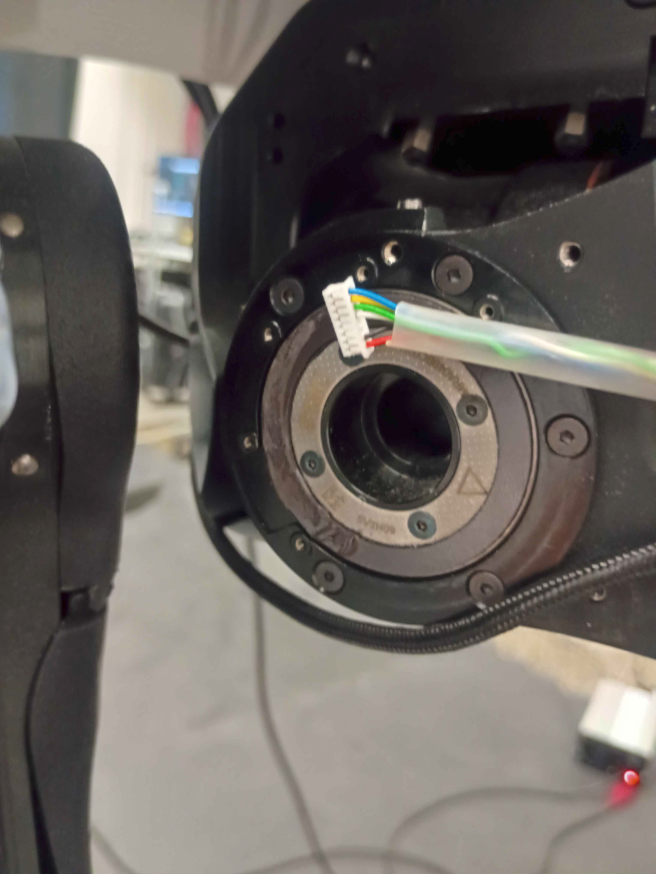
Re-aligning the encoder (RLS AksIM-2 tolerances):
| Parameter | Tolerance |
|---|---|
| Axial displacement (ride height) | 0.2 mm nominal ± 0.1 mm |
| Radial displacement | ± 0.3 mm |
| Tangential displacement | ± 0.3 mm |
| Non-parallel mounting | ± 0.05 mm |
| Out-of-roundness / eccentricity | minimize as much as possible |
Use a shim/feeler gauge to set the gap between reader and target. Adding thin M2 nylon washers between the metal support and the PCB increases the distance and prevents the target from being scratched again during joint motion.
Full root-cause write-up, photos and the PAL support thread (ticket #7006) are in the issue tracker: Talos leg_left_3_feedback_error (see the issue tracker for all open issues).
PlotJuggler won't start (package not found / segfault on launch)
In the PAL Ferrum (ROS Melodic) devcontainer, plotjuggler / rosrun plotjuggler plotjuggler fails for two independent reasons:
package 'plotjuggler' not found— the PAL wrapper/opt/pal/ferrum/bin/plotjugglerrunssource /opt/ros/melodic/setup.sh, which resetsROS_PACKAGE_PATHto melodic-only and drops/opt/pal/ferrum/share, sorosruncan no longer find the package.- Segfault on startup — PlotJuggler 2.8.4 queries
https://api.github.com/repos/facontidavide/plotjuggler/releases/latestfor updates and crashes while parsing GitHub's modern (HTTP 301 / JSON) reply.
The fix is a launcher that bypasses the PAL wrapper (execing the real binary with Ferrum on the package path) and blackholes api.github.com inside a private mount namespace so the update check fails fast. The real /etc/hosts, gh/git, and ROS networking are left untouched.
Save the script below (e.g. as plotjuggler.sh on the persistent workspace volume /catkin_ws/src) and symlink it into /usr/local/bin/plotjuggler from the devcontainer postCreateCommand so it survives container rebuilds:
#!/usr/bin/env bash
# Robust PlotJuggler launcher for the PAL Ferrum (ROS Melodic) devcontainer.
set -e

# Ensure ROS_PACKAGE_PATH includes /opt/pal/ferrum/share (needed for the
# binary's own plugin lookups), regardless of what the calling shell sourced.
source /opt/pal/ferrum/setup.bash

REAL_BIN=/opt/pal/ferrum/lib/plotjuggler/PlotJuggler

exec unshare -m -- bash -c '
  hosts_copy=$(mktemp)
  cat /etc/hosts > "$hosts_copy"
  printf "\n127.0.0.1 api.github.com\n" >> "$hosts_copy"
  mount --bind "$hosts_copy" /etc/hosts
  exec "$@"
' -- "$REAL_BIN" "$@"
unshare -m requires the container to allow the CAP_SYS_ADMIN capability (the default for these devcontainers). After installing, just run plotjuggler.
Backlash / slack in a hip (legs rest in different positions after push vs. pull)
Backlash in a hip can appear over time or after a fall, and it shows up as poor balancing when standing on one leg. To confirm it: start position control with the robot suspended in the air, put both legs to 0 (fully stretched), then hold the feet and try to push them closer together and then pull them apart. Some flexibility is expected, but if the legs stay at rest in a different position depending on whether you were pushing or pulling, there is backlash.
The fix is to re-tighten the actuator screws inside the hip. This must be done with the actuator at its 0 position, so the screws are tightened against the correct reference.
Warning
Tighten the screws while the leg is at 0 and lightly loaded through the foot. Tightening at any other position re-tensions the actuator against the wrong reference.
Step 1 — Remove the cover on the back of the hip. It is held by 4 screws (the two X marks and the two arrows in the picture below, circled in blue).
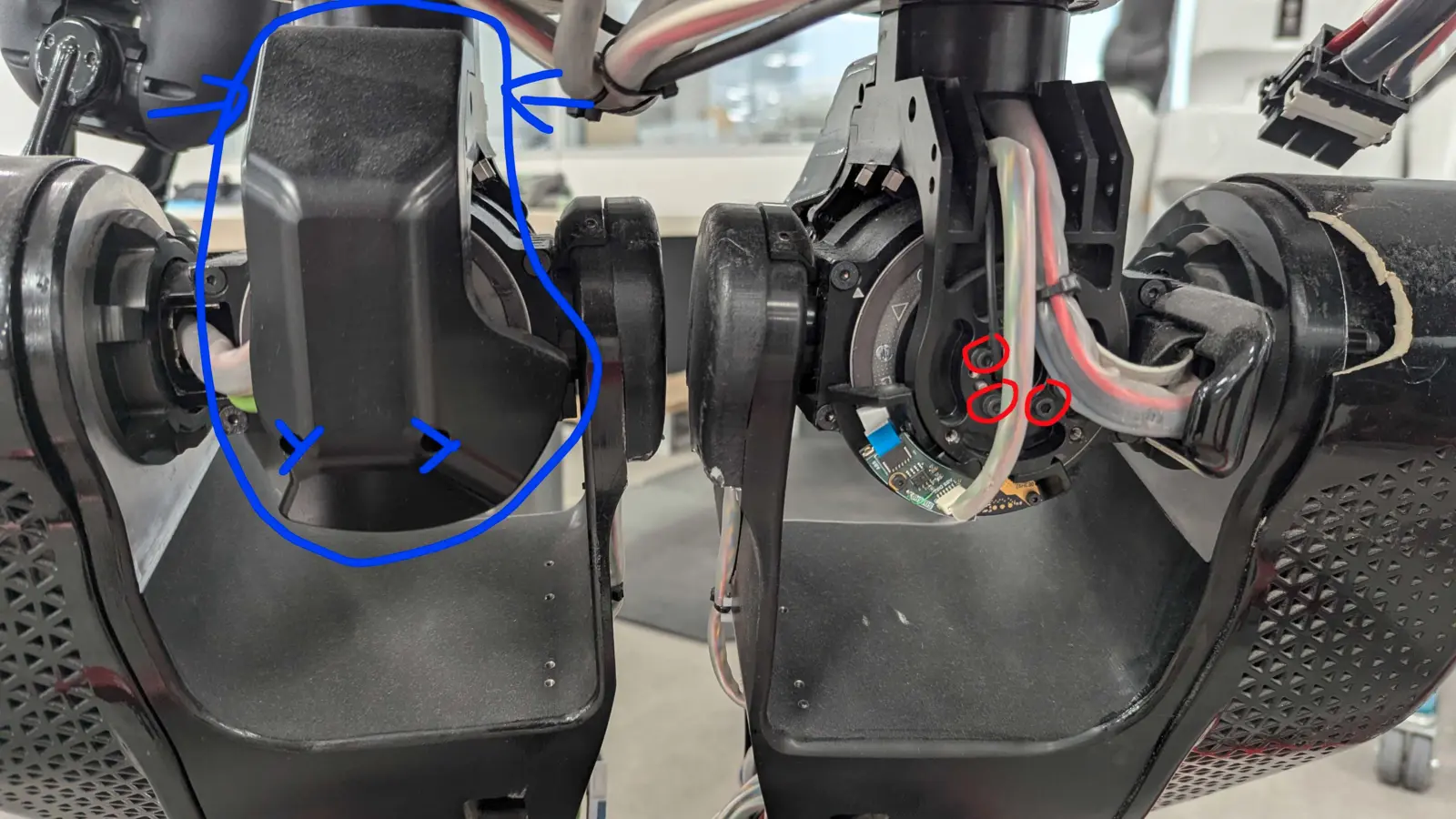
Step 2 — Tighten the six inner screws firmly (the ones circled in red). Do this while the actuator is at 0:
- Activate position control and put both legs to 0 (fully stretched).
- Lower the robot onto the ground just enough that both feet touch the floor.
- Tighten the six screws firmly with the robot in this position.
Do this for both legs, even if the backlash was only observed on one (typically the left).
Step 3 — Re-mount the covers and verify. Record a rosbag of the robot standing on each leg and compare against the earlier recording to confirm the backlash is gone:
# Start the dcm controller, then for each leg:
rosrun pal_locomotion_actions push_stand_one_leg_action -d 5.0 -u 5.0 -z 0.1 -s RIGHT
# wait ~30 s, then put the foot back down:
rosrun pal_locomotion_actions push_stand_down_leg_action -d 5.0 -u 5.0
# repeat with -s LEFT for the other leg
Procedure and photo from PAL support (ticket #7090).
Drive reports Serial number check failed after replacing a motor board
Each drive's serial number is stored in the robot configuration. At startup the deployer compares it with the serial that the drive reports. After you replace a drive board, the serials do not match and the drive stays in PREOP / NotReadyToSwitchOn. The diagnostics then show:
AL state: PREOP
CANopen SM state: NotReadyToSwitchOn
Driver state: Error
Driver error code: Serial number check failed
The expected serial is the serial_number entry in the motor's .cpf file on talos-7c. This file comes from the Debian package pal-ferrum-pal-deployer-cfg-talos-7:
/opt/pal/ferrum/share/pal_deployer_cfg/config/device/motor/<joint>_motor.cpf

<simple name="serial_number" type="long">  <value> 25490445 </value>  </simple>
To see the serials that are configured now:
cd /opt/pal/ferrum/share/pal_deployer_cfg/config/device/motor/
grep -H serial_number *.cpf
The root filesystem is an overlay
talos-7c boots with overlayroot. A change to /opt that you make directly is lost at the next reboot. To make the change persistent, write to the read-only lower layer /ro with PAL's rw / ro scripts. rw does not chroot by itself.
Update the serial (example: leg_left_5, new board serial 24082740):
ssh pal@talos-7c
sudo rw                      # remount the persistent root (/ro) read-write
sudo chroot /ro
cd /opt/pal/ferrum/share/pal_deployer_cfg/config/device/motor/
cp leg_left_5_motor.cpf leg_left_5_motor.cpf.bak
sed -i 's|\(name="serial_number"[^>]*>\s*<value>\) *[0-9]* *|\1 24082740 |' leg_left_5_motor.cpf
grep serial_number leg_left_5_motor.cpf   # check the new value
exit                         # leave the chroot
sudo ro                      # remount /ro read-only
sudo reboot
After the reboot, make sure that the drive reaches OP and that the diagnostics no longer show the error.
Note
If pal-ferrum-pal-deployer-cfg-talos-7 is updated (for example by a PAL software update), the package overwrites this edit. Send the new serials to PAL support so that they can update the robot's configuration package.
History of board replacements on Talos 7:
| Date | Joint | New serial |
|---|---|---|
| 2026-10-22 | leg_?_5 |
24082740 |
| 2026-10-22 | leg_?_6 |
24322121 |