MoveIt
MoveIt is a powerful open-source motion planning library for robotics in the ROS ecosystem. It provides tools for:
- Motion planning
- Collision detection
- Kinematics
- Robot control
- 3D visualization
For more information have a look into the official MoveIt documentation.
MoveIt via GUI
Before starting MoveIt you need to start the sim or real robot and the default controller which is explained in the simulation and DefaultController chapters.
To use MoveIt with a GUI for the HAINER robot, you can start RViz with the following command:
roslaunch talos_moveit_config moveit_rviz.launch
The following window should open:
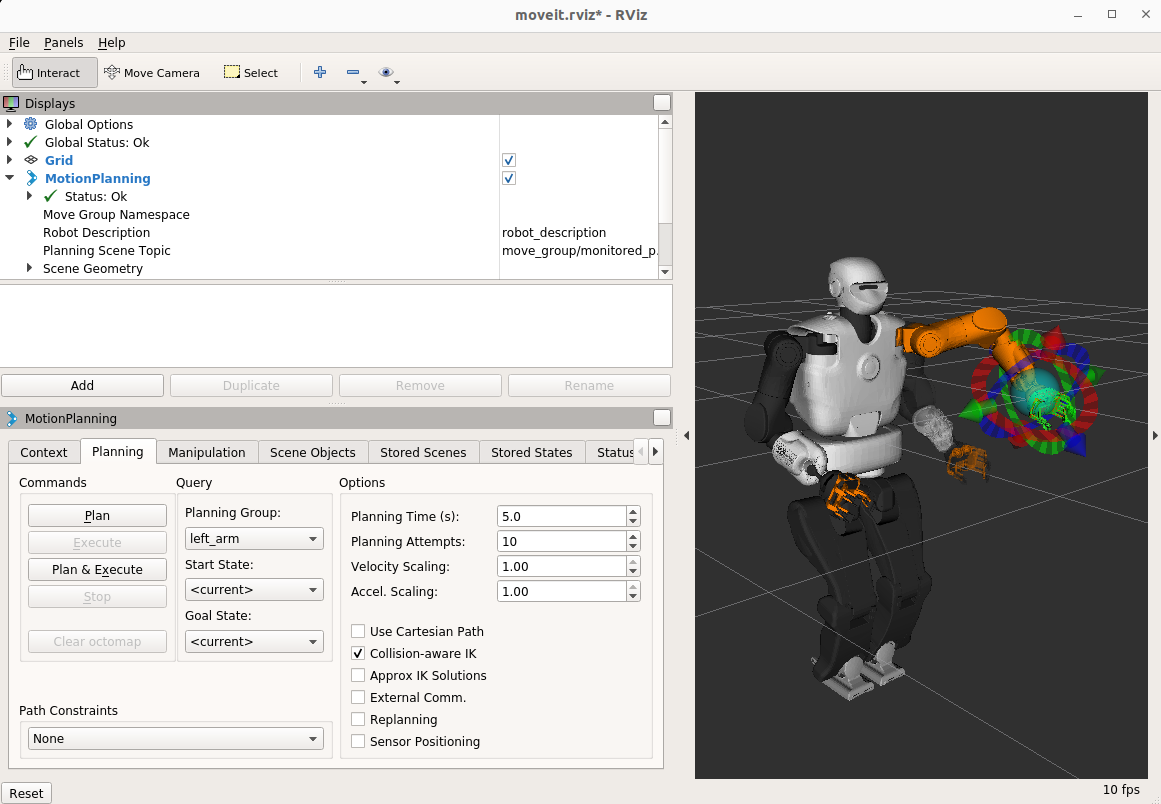
Once RViz is running:
-
Select a planning group (e.g., left_arm) from the dropdown menu in the "Motion Planning" panel.
-
Use the interactive markers (the orange ghost model with arrows) to drag and set a target pose for the end-effector.
-
Click "Plan" to compute a motion plan to the selected pose.
- If planning is successful, the planned trajectory will be shown as a preview in RViz.
-
Click "Execute" to send the planned motion to the robot.
Planning Groups
HAINER has the following MoveIt planning groups:
- both_arms_torso
- both_legs
- gripper_left
- gripper_right
- left_arm
- left_arm_torso
- left_leg
- right_arm
- right_arm_toros
- right_leg
- torso
Warning
If you are executing this on the real robot, make sure to follow these safety guidelines:
-
Ensure the motion path is safe and free of unexpected collisions.
-
Verify that all collision models in the planning scene are accurate and complete.
-
Be aware that external equipment such as OptiTrack markers may not be included in the collision models. These components can be easily damaged if impacted.
-
Always review the trajectory visually in RViz and double-check the environment before executing any movement.
MoveIt via Code
Move It is installed on HAINER without python interface. As a workaround we can simply use the provided services instead of the pycommander.
move_group services and actions
The move_group node provides the following services:
| Service Name | Service Type | Purpose |
|---|---|---|
/apply_planning_scene |
ApplyPlanningSceneService |
Apply updates to the planning scene |
/clear_octomap |
ClearOctomapService |
Clear the 3D occupancy map |
/compute_cartesian_path |
GetCartesianPath |
Compute Cartesian trajectory between waypoints |
/compute_fk |
GetPositionFK |
Compute forward kinematics |
/compute_ik |
GetPositionIK |
Compute inverse kinematics |
/get_planning_scene |
GetPlanningScene |
Retrieve current planning scene state |
/plan_kinematic_path |
MotionPlanService |
Compute motion plans for joint/pose goals |
/query_planner_interface |
QueryPlannerInterfaces |
List available planners and capabilities |
/check_state_validity |
GetStateValidity |
Check if a robot state is valid (collisions, constraints) |
And the following actions:
| Action Topic Prefix | Action Type | Purpose |
|---|---|---|
/move_group |
MoveGroupAction |
General motion planning and execution |
/execute_trajectory |
ExecuteTrajectoryAction |
Executes a pre-planned trajectory |
/pickup |
PickupAction |
Executes a grasping/pick operation |
/place |
PlaceAction |
Executes a placing operation |
For example we can do:
- call
/compute_cartesian_pathservice to plan a path - send the result to the
/execute_trajectoryserver to execute it
An example implementation can be found in the repo moveit_script.
Warning
If you are executing this on the real robot, make sure to follow these safety guidelines:
-
Ensure the motion path is safe and free of unexpected collisions.
-
Verify that all collision models in the planning scene are accurate and complete.
-
Be aware that external equipment such as OptiTrack markers may not be included in the collision models. These components can be easily damaged if impacted.
-
Always review the trajectory visually in RViz and double-check the environment before executing any movement.
Other Controllers
Currently MoveIt only works with the default controllers!
The controllers to use are define in the package talos_moveit_config
To make it run with other controllers you have to change the config files accordingly:
roscd talos_moveit_config
cd config
nano controllers_full.yaml
# edit controllers to your needs
Known Issues
General Troubleshooting
- ROS ID is set correctly
- ROS master is set correctly
- Check known issues
One Arm Works, The Other One Doesn't!
If MoveIt only works for one of the arms, try this fix.